
Hyundai Genesis (DH): BLUE LINK / BLUE LINK Unit(I-BOX) Components and Components Location
Hyundai Genesis (DH) 2013-2016 Service Manual / Body Electrical System / BLUE LINK / BLUE LINK Unit(I-BOX) Components and Components Location
| Component |
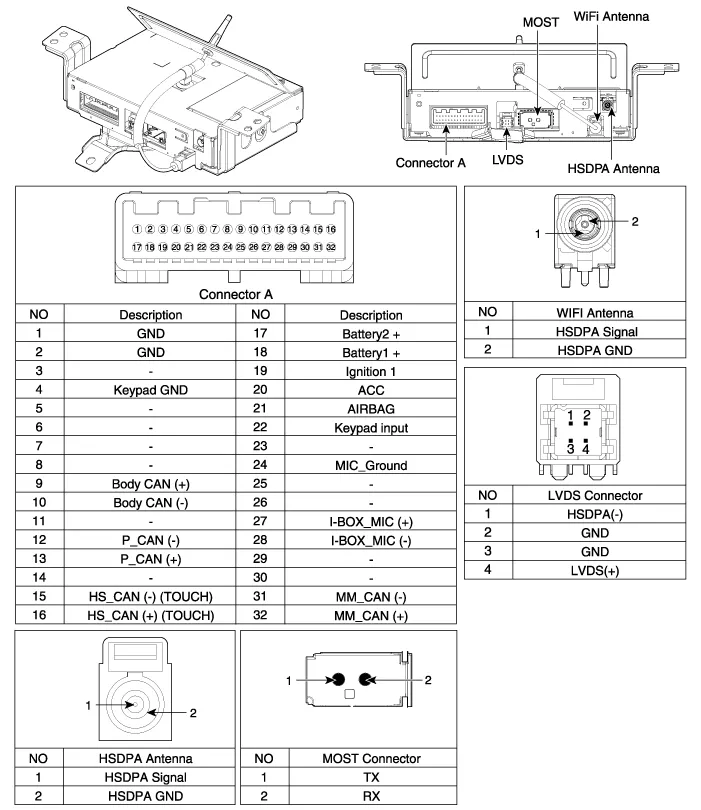
Description Vehicle information systems (BLUE LINK) based on state-of-the-art IT systems, safety and security The term "Telematics" is a combination of telecommunication and informatics.
Removal 1. Remove the battery(-) terminals. 2. Remove the AVN monitor. (Body - "Premium AVN System" ) 3. Disconnect the cables and connectors (A) from the MTS unit.
Other information:
Hyundai Genesis (DH) 2013-2016 Service Manual: PGS Unit (Back & Blinde Unit) Schematic Diagrams
C
Hyundai Genesis (DH) 2013-2016 Service Manual: Power Mosfet Repair procedures
Inspection 1. Turn the ignition switch ON. 2. Manually operate the control switch and control the voltage of the blower motor. 3. Select the control switch to raise the voltage until high speed. Specification Fan Speed (Manual)Motor Voltage (V)13.
Categories
- Manuals Home
- Hyundai Genesis Owners Manual
- Hyundai Genesis Service Manual
- Body (Interior and Exterior)
- Parking Assist Sensor Repair procedures
- Evaporative Emission Control System
- New on site
- Most important about car

Copyright В© 2026 www.hgenesisdh.com - 0.026